How to Sell Telegram Accounts on Telekuy
Start Selling Telegram Accounts in a Few Simple Steps
This guide will help you start selling your Telegram accounts on Telekuy. You'll learn how to add products, choose the right upload method, and publish your listings so buyers can find them easily.
Watch: How to Sell Telegram Accounts on Telekuy
1. Go to the My Product Page
First, login to your Telekuy account. Then open the My Product page from the navigation menu or use this direct link:
On this page, you can manage all your Telegram account listings: create new products, edit existing ones, or pause products that you no longer want to sell.
2. Click "Add" to Create a New Product
To start selling, click the Add button. This will open a new form where you can choose how you want to upload your Telegram accounts.
3. Choose Your Upload Method
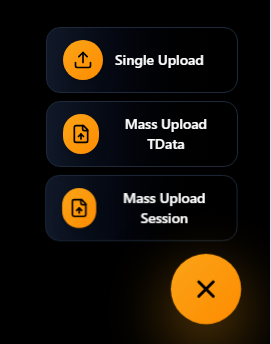
Telekuy currently supports several upload methods for Telegram accounts. Choose the one that matches the file format of your accounts:
- Single Upload – Best for selling a small number of accounts. You can upload and configure each account one by one with detailed information.
- Mass Upload TData – Use this if your Telegram accounts are stored in TData folders. Ideal when you want to upload many accounts at once.
- Mass Upload Session – For accounts stored as Telethon session files. This is recommended if you already converted your accounts into session format.
Upload Options Preview
4. Fill in Product Details & Pricing
After choosing the upload method, complete all required fields:
- Product name – Clearly describe the type of Telegram account (e.g., "Old Telegram Account - 2018 registration").
- Description – Add important details such as country, age of the account, phone number region, and any special notes.
- Price – Set a fair and competitive price per account or per batch.
- Files – Upload the TData folders or session files according to the method you chose.
5. Submit and Publish Your Product
Once everything is filled in correctly, click Submit. Your product will be saved and, after passing basic checks, will appear on the marketplace so buyers can view and purchase your Telegram accounts.
You can always return to the My Product page if you want to edit, pause, or update your listings.
Advanced: Convert Telegram Accounts to Session Files
If you prefer using the Mass Upload Session method, you'll need to convert your Telegram accounts into session files first. Watch the tutorial below to learn how:
How to Register on Telekuy (Step-by-Step)
Last updated: 12/15/2025